Showing posts with label APA proofreading. Show all posts

Wednesday, 30 August 2017

Is Professional Editing Plagiarism?

Image by Stuart Miles at FreeDigitalPhotos.net
Is professional editing plagiarism? Many colleges and universities think so. After all, if learning to write better is part of the academic goal, isn't paying someone to fix your writing cheating?

Clearly, if the university says professional editing is against the rules, then it's against the rules. According to the University of Puget Sound, "allowing others to manipulate your words and sentences to the point that they are obviously not your own is a form of plagiarism."

What institutions suggest is that students have someone point out writing problems and then attempt to correct these problems themselves. But I don't think I'd offer value for money if I returned an essay that merely showed sentence after sentence highlighted with a list of grammar terms that my client didn't understand.

I'd argue that these rules privilege those of us who arrive at university with a good writing background and fluent in English. It's just unfair. I argue that professional editing is part of the learning process, not an attempt to plagiarize.

I'm a high school teacher, and by law, I'm only allowed to mark students on the established curriculum. So, I can't take marks off for students who come late, hand in work late, have a bad attitude, etc. Then suddenly at university, students are losing marks in sociological theory, nursing practice, or psychology because they make errors of capitalization, comma usage, and syntax. Or worse, they are charged with plagiarism when after all their careful research and original writing, they hire a professional editor to polish the essay.

There's no doubt that these are essential skills to master to be a competent professional in your chosen field. But I'd classify these as part of the "soft" skills that make a big difference in your professional success, like how you dress, comport yourself, and speak. They are not part of the core skills on which the university should be marking you in the course. Further, although a few students may be going on to academic careers, the majority are going to go into the working world and practice a profession. And in the real world, it's not considered cheating to hire an editor. In fact, the more advanced the writer, the more likely he or she is to work with an editor!

I use "track changes" in my editing, and I've seen students grow in their writing over several years as they use my professional editing service to polish their university writing. I can't imagine how some of these students would have managed to progress through their education without my help.
I had one client working on a Master's degree in Nursing whom I suspect had a learning disability. As a learning support specialist, I see students like this in high school—otherwise, intelligent students for whom writing is an extreme challenge. Add the use of English as a second language, and the writing can be almost unintelligible at times. But this student knew her nursing. She never misspelled the names of drugs, body parts, or scientific theories. She understood the core curricular material clearly. Over time, I watched her writing improve. She never mastered strong writing skills, but she was undoubtedly paying attention to my edits and learning from them.

I believe that only highlighting errors without correcting them is not sufficient for struggling students. That's why many grammar correction programs are not useful. When I see a run-on sentence with some word errors, comma errors, and capitalization errors mixed in, is it helpful to just name the mistakes? I think students need to see correct sentences to learn to write correctly.

Many of my clients are the first in their families to go to college. Many do not speak standard English at home, or they use another language altogether. Insisting that students produce polished, grammatically correct essays when they are struggling to read the texts as well as do academic research with critical thinking is unfair. For students who attended a top high school with advanced English classes, this is an easy first step to college writing. But my high school has many struggling students. The grade 12 English teachers are struggling to help the majority of students meet the minimum criteria for graduation; they don't have enough time to coach the college-bound students in the finer points of writing.

For students of color in the United States, calling professional editing plagiarism is nothing less than institutional racism. It privileges those students whose parents were college educated and who attended better high schools. My clients include university professors who use English as a second language. Are their professional publications "plagiarized" because they have an editor?

Worst of all, many university and college professors continue to enforce "zombie" grammar rules such as not splitting an infinitive or not ending a sentence in a preposition, which are seen by grammarians as arbitrary and not part of the natural grammar of English. My editing practice is to ensure students avoid these grammar errors just in case the professor believes in these outmoded ideas of grammar.

I'm going to continue to assist students at all levels to hand in grammatically correct essays because I believe professional editing is not plagiarism. In a world where students can purchase custom-written essays easily, I support those who have done the hard work of research and writing but need additional help to hand in an essay that meets all academic writing requirements for grammar and format.

Friday, 20 November 2015

How to use spell check to improve your essay writing

The attached image comes from an essay I recently edited. Clearly, the intended word was "profitability." Fortunately, I spotted the error and corrected it. But it's unlikely that the client typed "probability." It's much more likely that she typed something else and the spell checker in M.S. Word flagged it, and she changed it to this word. Look what happens if I write a similar word to "profitability," but slightly misspelled.

Of the three suggestions for "profability," the correct word "profitability" is not included! It's so easy to choose the wrong word from the list. In fact, our brains are wired to see the word we expect to see. That's why proofreading your own work can be so hard. Once you believe that the correct word is there, you will see the correct word. Part of the skill of proofreading is teaching yourself to slow down and really see each word that's on the page, not the word that we think should be on the page.

Once you accept the wrong word, it becomes even harder to spot when you are proofreading. Because it's a correct word, it's no longer underlined in red. But now your brain really thinks you've corrected it, so it's even more likely to fail to notice the error when you proofread.

I actually think many people would benefit in their writing if they turn off spelling suggestions. This means you won't see any red underlined words at all, during the writing process. The advantage is that you can simply focus on the content of what you are writing. For anyone who struggles with spelling, or even keeping in mind the complex ideas that make up an essay paragraph, this means completing the whole sentence before even thinking about the spelling.

To do this, simply uncheck the "Check spelling as you type" option in the M.S. Word preferences. You can write with spelling errors and focus on your ideas. When you complete the whole document, you can still use the spellcheck tools to check your work.


However, as you can see, the options are still limited by the guess that M.S. Word has for what is the right word. In this scenario, you would still be wrong to pick the word from the list. You need to pay sufficient attention to the suggestions to realize that you need to actually type in the correct word. If you can get closer, then the spell checker can probably guess it.
And one more thing. Here's a screen shot from an on-line proofreading service, Ginger. Notice that Ginger, like MS Word, can't see the error. For accurate proofreading, there's nothing like a human.

Saturday, 17 October 2015

How to use APA references: Just the basics

We edit psychology papers

In every new school year, another crop of scholars is faced with the perennial issue of using citations in their writing. Many people engage me to edit psychology papers. Of course, psychology is the main discipline to use APA, but many professors assign APA style as the reference style for papers in a wide variety of disciplines. Here are a few tips to make it easier. I'm keeping it short and sweet with just the basics here, so if you have more questions, check out some of my other posts under APA Style, or visit the OWL, which is a great source for writing advice in APA, MLA or Chicago style.

Use parentheses correctly

The first thing you need to know is how to use parentheses. When you put something in parentheses it adds to the sentence, but the sentence must be able to stand alone without it. When you use APA, you are told to enclose the author's name and year of publication in parentheses (Francis, 2015). Notice that the sentence above reads perfectly well without the part in parentheses. However, there are two ways to make a citation. Sometimes you introduce the author's name with a signal phrase at the beginning of the sentence. In this case, you only put the year in parentheses.

According to Francis (2015), blah blah blah.

What I see with some new writers is that they have got stuck on the idea that the author's name is always in parentheses, so they write: "(According to Francis, 2015), blah blah blah." That's quite wrong, since the words "According to Francis," are supposed to be part of the body of the essay, not extra. Notice also that the comma comes after the closing parenthesis mark because the parenthetical date belongs with the name.

Find the right source

The next place people commonly make errors is in citing material they found on the web. Now the first thing you need to know if you are writing a college or university essay is that you DON'T TRUST THE WEB. Use your college or university library and cite peer-reviewed journal articles that you access through the college library. You will probably need a log-in to use the college library, but they have access to journals that are written by experts in the field, and reviewed before publication by other experts in the field. That's why they are more trustworthy. So if you are writing about the history of gun control in the US then the Journal of Social Science is much more trustworthy than the San Jose Times. Choosing the right source will show your teacher that you are seriously researching and will be reflected in your mark. In high school, teachers are trying to get you to learn to simply use citations. In college, they are trying to teach you how to do research. If you are not digging deep, then you are not doing the job and your marks will reflect this lack of effort, even if your writing is good.

Cite the author's name

Once you have found a fact that you want to cite, the first thing you need to know is the author's name. Any journal article should provide this easily. If you have difficulty finding the author's name, then possibly it's not a reliable source. If the San Jose Times doesn't give a byline to the author, then it's about as trustworthy as a rumor you heard on the bus, but if you are citing a general publication like this and there is no author, then and only then, do you use the title of the article, enclosed in quotation marks ("Gun control bad", 2015). Often you find organizations that publish web pages with the information you need, and you can cite the organization as author (American Association of Gun Dealers, 2015). Neither of these is as reliable as a peer-reviewed journal article (Smith, 2015). Notice that in all these cases, you provide the minimum information to identify the article. Every citation must match a full entry in a reference list where you provide the name of the author, date of publication, name of publisher, and URL if you downloaded it from the web. Here are some tips for writing a reference list in APA.

Tuesday, 11 August 2015

5 tips for your APA reference list

Creating an APA style reference list can be complex. Many students, even graduate students working on PhD dissertations still get it wrong. In this post, I'm going to give you the basic format.

If you can do these five things, you will get your references at least 90% right every time.

Here's what a citation should look like.
In this case, the organization is cited as the author. Read this post about citing webpages. It explains when to cite the organization as an author. The format is the same when you cite a human as an author.

1. Begin with the author(s). Most of the time you will have the last name of the author. In the example above, there would have been no individual connected with the article because it was a statement put out by an organization. Write the last name of the author followed by the first initial. Include the second and third initials if they are provided. Do not try to treat the name of an organization as a personal name. I've seen writers who would have written Association, A.S. as the author for this citation.

2. Get the date right. Use the date supplied by the document. If it's a webpage and it's "Copyright 2012-2015" then the last date is 2015. Use it. Do not use the date you accessed it. Once I found that every webpage cited by a writer was 2015, the year the paper was written. This seemed strange to me, so I looked up the actual documents. I found dates from 2005 to 2012. The writer was using the date they accessed the documents. What the APA cares about is when was the document written, so you know how recent the information is.

If, as in the example above, an exact date is provided, then use it. That's common for periodical publications that are monthly, or in this case, a public report that was released on a specific date. Most of the time you will only have the year.

3. Where to use italics. Use italics for the name of the publication. Generally this is only the journal name or a book name. Do not use italics for the name of an article. Notice the article above is very long. Write out the whole name of the article, but do not use italics.

4. Citing electronic sources. Electronic sources are one of the common sources of information. Journals are published on-line, and we often search for information while sitting at our desks. Notice that the citation above is from an on-line source. However, according the the APA style blog, you don't often need to cite the access date. You  only need to cite the date when it's something like a Wikipedia entry that could be constantly changing. However, you do need to include the source (Retrieved from http://www....)

5. Formatting. Create the reference list using 12 point Times (or the same font and size as your essay), center the word References at the top of the page (not bold), use a 1/2 inch hanging indent, and double space throughout with no extra space before or after each entry. (That's 5 extra tips in this blog post, absolutely free!) If you don't know how to set up MS Word to format a hanging indent using the paragraph tool, read this post.

Bonus! Notice that each individual part of the citation is separated by a period. Name (period) Date (period) Title (period) Source (period) Retrieval date (NO PERIOD). What?! There's no period at the end of the URL to avoid confusion. Makes you yearn for MLA, which encloses the URL in < > signs just for clarity.

Tuesday, 21 July 2015

It's too late to learn APA when you're finishing your thesis

APA citation stylesFrankly, I'm amazed how far people can get without learning the basics of citation styles. I've edited many Master's theses and even a few PhD dissertations in which key parts of citations were done incorrectly. These things should be mastered in first year college.

Let's review the purpose of citation. We use citations to provide credibility to the arguments we are making. A citation answers the question "How do you know?" for each fact that you assert.

APA style uses two criteria to show how much weight a source has: author and date. It assumes that later citations are more likely to be correct than earlier citations. It also assumes that some authors are more credible than others.

But APA doesn't want you to fill up your page with a lot of other junk that's not necessary to show the credibility of your source. That's why the URL and publisher information are listed in the reference section. The whole idea is to keep the body of the paper nice and tight, and leave it up to the reader to check out the reference section if he/she wants more information or to track down the original source.

I just finished editing a Master's thesis in which almost all of the in-text citations did not appear in the reference list. In the reference list was a whole bunch of stuff that was not cited in the paper. It's a complete disaster from a credibility point of view. The reference list is not suggested extra reading for anyone with a burning interest in the topic. The point of a thesis is to make an argument and to show that the facts behind your argument are credible. References should be strictly a list of sources of information actually used in the paper.

Don't Master's programs require you to write a number of essays in courses leading up to your thesis? I know that some undergraduate teachers can be lazy or inconsistent in checking writing for APA style, but surely there must be some kind of course for people who are required to write a thesis? I'm actually shocked at some of the people working in graduate-level programs. I think (private universities are particularly guilty of this) that the admissions offices looks at the tuition fees more than the academic ability.

I think part of the problem is the move to teach undergraduate courses by sessional instructors. These instructors are underpaid and over-worked. They may not have the luxury of time to carefully critique papers, thus teaching undergraduates how to write proper academic essays. When I was early in my education, I thought references were for the birds. I was casual about citing sources. A great teacher set me straight. After that I was diligent in citing sources, but rarely did I get a paper back where a teacher had corrected some technical aspect of my citations. Really, it took until I became a professional editor that I learned about sources like Purdue's OWL, which sets out clearly all the formatting to properly reference a paper in MLA or APA style as well as providing other writing instruction.

If you are an undergraduate and you intend to go to graduate school, or continue your academic career in any way, you need to ensure you understand how to use citation styles properly. Access your school's writing resources, or take the time to look things up online. Even if your mark doesn't depend on it now, it may be important later. And it could be too late then.


Friday, 17 October 2014

Differences between APA and MLA citation styles

APA style and MLA style are both used to document references, but they are formatted slightly differently. Here's a handy chart to tell some of the differences.

Differences Between APA and MLA Citation Styles

APAMLA
Cover PageYes. Centred in the middle of the page, five double spaced lines with
Title of paper,
Name of Author
Course Name,
Course Teacher,
Date
No. In upper left corner, in three double spaced lines:

Name of Author,
Name of Teacher,
Course Name,
Date
Running HeadYes. A shortened version of paper title in upper and lower case in header of every page. On cover page only it is preceded by the words in upper case: RUNNING HEAD. Page number is flush right.Yes. Author's last name, then a space and the page number flush right.
MarginsOne inch all around.One inch all around.
In-text citations(Author_name, year). Comma comes after name and before page. If page number is known, add another comma and then p. + page number. Only use the author's initial if there is more than one author listed in the citation page with the same last name. If the same author has two publications cited in the same year, identify each with a lower case letter (Smith, 2013a) and (Smith, 2013b).(Author_name page). No comma between name and page. Only use author's initial if there are more than one author with the same name in the works cited section. If the author has more than one work in the works cited section use a superscript numeral to connect the in-text citation with the citation on the works cited page (Melville1 45) and (Melville2 678). Sorry, can't make the numbers superscript in html.
Citation FormatUse past tense to describe research findings: "Jones (2013) said widgets are dangerous when wet."Use present tense to describe statements made in cited works. "Eliot says April is the cruelest month."
Reference PageCenter the title "References"Center the title "Works Cited"
Reference FormatArranged alphabetically by last name, with only initials for first and middle names. Double spaced, hanging indent with no extra space between entries. The title of longer works is in italics.Arranged alphabetically by last name with first name written out and initials for middle names. Double spaced, hanging indent with no extra space between entries. The medium of publication must be included (web, print, video, etc.) The title of longer works is in italics.
Sample Reference Journal ArticleAuthor, A. A., Author, B. B., & Author, C. C. (Year). Title of article. Title of Periodical, volume number (issue number), pages. http://dx.doi.org/xx.xxx/yyyyy 

Include the Digital Object Identifier (DOI), if possible.
Author, Alan. A., Author, Bob. B., & Author, Cathy. C. "Title of article." Title of Periodical, Month, year, pages. Medium of publication

Note: MLA does not require the full URL to be included, but many instructors do. Check with your teacher. Include the date you accessed it, if the medium is "web".
Sample Reference Web Page Known AuthorFrancis, P.J. (2014). Differences between APA and MLA style. Essay Writing Tips. Retrieved from: http://essaywritngtips.blogspot.ca/ 2014/10/differences-between-apa-and-mla.html.Francis, Peter J. "Differences between APA and MLA style." Essay Writing Tips, 2014. Web 17 Oct 2014.
Sample Reference Web Page Organization as AuthorCentres for Disease Control. (2014) Ebola. Retrieved from: http://www.CDC.com/Ebola.Centres for Disease Control. Ebola. Web 17 Oct 2014.

Bookmark this page to come back. For more detailed information, visit the OWL Writing Lab at Purdue University.
If you need help formatting your essay, hire me for full editing including formatting. See link above.

Tuesday, 14 October 2014

APA sample essay

If you are new to essay writing, this post is for you. APA style is simply a description of how to set up an essay and how to cite the sources you use for information. An APA essay is set up with 1 inch margins all around and double spaced lines. Here's a sample page of an APA essay.


There are a couple of things to notice. First, each page has a header with a running head on it. The running head is a short version of the paper title in all caps. The reason that you use a shortened version is that some titles might stretch over more than one line, and all you need to do is identify the title for each page. Second, you have a page number in the upper right corner. If you don't know how to set up a running head in MS Word, then read this blog post: How to format headers in APA style.

Notice that in addition to double spacing the lines, there is no extra space between paragraphs and each paragraph starts with an indent of 1/2 inch.

An APA essay also includes a cover page. Here's how to format an APA cover page.

That's all there is to setting up the format of the APA essay. The rest of the details on APA style have to do with how to make citations. Notice that in APA style the references are in the form (Last Name, year, page). That means after you refer to any information from another source, you include a reference to that source. Put the last name of the author(s), the year of the publication and the page number that the information can be found on. If there is more than one author, list up to 5 names. If there are more than 5 authors, list four followed by et al. Notice that "al." is an abbreviation, so requires a period. After the period, put a comma like this: (Francis, Smith, Jones, Brown, et al., 2014, p. 14).

Here's the thing that stymies many students writing an essay in APA style: how to cite a web page. I've done a whole blog post on this, but here's a brief summary. See if you can find an author. If you can name a person who wrote the post (for example in a newspaper article found on-line) then cite the name of the author as you would normally do. If the article is posted by an organization, and the purpose of the organization is related to the topic, then cite the organization. That might be true for citing the Alzheimer's Society, or the Centers for Disease Control (CDC, 2014). But if it's an organization that is organized for the purpose of sharing widely disparate information, then cite the title of the article in quotation marks. This would be the case for example if you cite an article from wikipedia ("Africa", 2014). Notice the dates are included. Many webpages have a date somewhere on the page. If there is not date, put "n.d." Each citation needs to match a citation in your References page. The citations are arranged in alphabetical order according the the name of the author (or organization, or article title). In the citation on the reference page, you would include the full URL so any reader can locate the article. Remember, the purpose of a citation is to let a reader verify any information you provide, so you need to provide clear directions of how to find the original source. Generally this means four pieces of information: Author, Date, Publication, and Publishing source.

And that's APA citation in a nutshell! For more information on specifics of APA citations, I like to refer to the Writing Lab at Purdue University. Also, APA has a blog on which it posts helpful information and answers questions.


Saturday, 11 October 2014

How to create a cover page in APA style

Creating an APA cover page is quite simple. It requires a minimum of information, but it shows your professor that you understand the basic details of APA style. An APA cover page has three basic features: a running head (with a shortened version of the essay's title), a page number, and a center section with the title of the essay, the name of the writer, the name of the course, the name of the professor, and the date, each on a separate line, double spaced.

Here's a simple graphic:

Notice that the running head begins with the words RUNNING HEAD in all caps. This is the only page on which the words RUNNING HEAD in all caps will appear. On all the rest of the pages only the actual running head (in normal upper and lower case) will appear. If you don't know how to insert a header, then read the blog post on how to create a header in APA style essays. Remember, you will format the header differently on all the other page, so you need to make sure that the document is formatted for different header on first page.


For the middle part of the cover page, simply enter the required information, set the paragraph setting to double space and the line format to centered.

After the date, place a page break. Use the page break function from the Insert menu. Don't just put a bunch of returns until the cursor moves down to the next page. That's sloppy and if you end up editing the cover page and there's a line added, then the extra line will move down and affect every page of your essay. If you don't know how to put in a page break, read my blog post 5 Essential MS Word Skills Every Student Should Know.

Saturday, 20 September 2014

How to format headers in APA style essays

Many students find it difficult to format their APA essays with headers. Following these simple steps will solve this problem. In this post I will tell you how to insert running heads and page numbers in APA documents. These steps also work for heads in other style of essays, such as MLA, but the specific formatting may be slightly different.

Here's one of the most frustrating things about MicroSoft Word. The menu item used to insert a header is under the VIEW menu. Even after years of editing essays, I almost always look for it under the INSERT menu because I'm thinking to myself "I need to insert a running head." Ironically, after the header is created, you merely need to double click on it to edit it, so you don't need to go back to the VIEW menu to edit the header.

Notice that this is called "Header and Footer." The header and footer editing screens are always active at the same time, but you don't need to use footers in APA essays. They are used for other types of documents.

Once you have the header editing screen active, you need to type in the header info. Notice that APA requires the first page (the cover page) to have the header begin with the following phrase in capital letters: RUNNING HEAD. I don't know if they think anyone reading a university level essay might be stupid enough to not know why there is a title above every page of the essay, or if they just want to justify the use of the caps lock key every time someone writes an essay, but I think this looks ugly. I would dispense with this if it were up to me.

The other thing to notice is that the running head is not necessarily the same wording as the title. The running head should be short enough to fit on one line (leaving room for the page number) along with the words RUNNING HEAD. Let's say your essay title is "Sylvia Plath and the tortured genius: modern feminism and the struggle for autonomy in artistic creation." (Apologies to Sylvia Plath scholars, feminists, and artists.) That's way too long to fit on one line at the top of every page. So the running head would look like this: "RUNNING HEAD: Sylvia Plath and artistic creation."

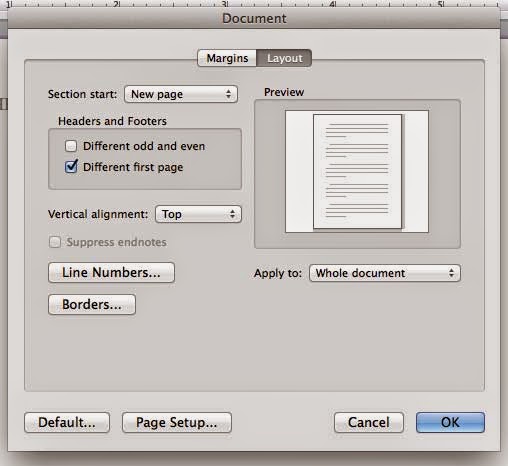
Only the cover page needs the caps lock RUNNING HEAD. All the other pages in the essay will have the short version of the title (but now it's in ALL CAPS). So you are going to have to insert the header one more time, but before you do that, you need to make sure one thing is set in the document. The formatting of the document needs to be set to have a different first page (the cover page). To do this, access the DOCUMENT formatting window. It's pretty simple. Under the FORMAT menu, select DOCUMENT, and the DOCUMENT window will open. Click on LAYOUT and the the check box on "Different first page." Now the second page in the document will have no header, so you can go to the second page, use the VIEW menu to view the editing screen for the header and footer, and then type in the running head in all caps.


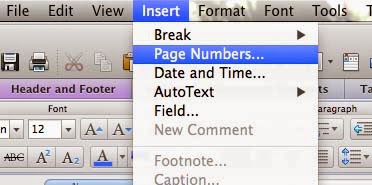
But now you need to also insert the page numbers. The headers are conveniently set up with pre-set tabs. As an aside, you should never move characters over by using a bunch of spaces. If you hit repeated spaces to move the page numbers to the right, then the location of the page numbers will be inconsistent depending on the computer of the person viewing the document. In some cases, the page numbers might even jump to a second line on the left. Always use the tab key (on the left side of the keyboard, just above the caps lock key) to move things. And take the time to learn how to set tabs. Depending on how long your running head is, when you hit the tab key, the cursor will jump to the middle of the page, or to the right hand side. If it goes to the middle, then do another tab to get the cursor to the right. Under the INSERT menu, choose PAGE NUMBERS to call up the page number dialogue box. Make sure you have alignment right and show on first page checked, and click OK. You can change the format to Roman numerals, etc, but probably the default is correct. If you have multiple sections on a thesis, then you need to use different formats and start the regular numbers on the first page of the actual content. Now, all you have to do is click the "Close" box on the little line under the header, and every page in your document will be properly formatted with APA headers.

Tuesday, 26 November 2013

How to cite a webpage in APA style

There seems to be some controversy over how to cite a web page using APA style. When a student finds information on a website, he or she often uses the title of the article as the reference. For example, citing this page he or she would use ("How to cite a web page", 2013). This is wrong, because there is clearly an author for this blog post: Peter J. Francis. You should cite the name of the author, just like you would a journal article. Be thorough; look carefully in the fine print for an author.

Just today I edited an essay that cited three newspapers. I know that virtually every story in a newspaper has a byline. I used to write for newspapers and seeing my name in print was half the reward. There is absolutely no reason not to know the name of the author of a newspaper article. Normally, when I am editing, I correct these things, but this person had not provided the full url in the reference section (which I pointed out when I returned the paper).

However, often a webpage is written by the member of a staff of an organization. Let's say HyperGraphix was a big anonymous editing company and there was no author on the page. Would you cite it as ("How to cite a webpage in APA style", 2013) or (HyperGraphix, 2013)?

I've researched this a lot and the answer is contradictory. Sometimes you use the name of the organization, sometimes you use the title of the article. I will try to tease out what the difference is.

There are four elements necessary for a complete citation: author, date, title, and url. Format is added if the format is out of the ordinary, such as a blog post, or lecture notes. One or more of these may be missing. This link tells you to use the title when you have no author.
http://blog.apastyle.org/files/how-to-cite-something-you-found-on-a-website-in-apa-style---table-1.pdf

However, this link says to use the organization as author when you have no author named. http://www.apastyle.org/learn/faqs/web-page-no-author.aspx

Normally I use the OWL (Purdue University Online Writing Lab) as my goto source for APA references. https://owl.english.purdue.edu/owl/resource/560/01/ This easy to use resource has lots of examples for all APA questions. There is also an MLA section, and I recently discovered a Chicago section. Many universities have APA or other style references, but I find this one to be the most comprehensive. But the OWL is strangely silent on the web page with no author. Maybe they don't give a hoot!

The two links above are both from the APA, so which is right? I had a client marked down because she used a title where an organization should have been used. I think the question is whether the organization is a professional organization, or is it just a place that posts information. For example, my client was doing a Master's degree in Nursing and was citing a document from the Centers for Disease Control. So this is a document that has been prepared for and by an organziation (CDC, 2013). Cite the organization.

On the other hand, if you were citing Travelocity's tips for vaccination, then Travelocity is merely posting information it has obtained elsewhere. Cite the webpage title ("Get stuck for health", 2013). Notice the webpage title used double quotation marks. You can use an abbreviated version of the title.

This makes some kind of sense because you can trust a named author more than an organization and an organization more than some webpage. There's a hierarchy of trust.

Back to my original question. Would you cite it as ("How to cite a webpage in APA style", 2013) or (HyperGraphix, 2013)? I would like to think you would use the latter. HyperGraphix is my editing business, and I should have some expertise. In addition, this website is the sole property of my editing business, and it's not designed to let other people post. You can be certain that HyperGraphix is responsible for the content. So give me the credibility of using my business name.

The next problem is how to set up the reference in the reference section. Do not use quotation marks on the title in the reference section. The first part of the entry should be the same as the in-text reference. As I explain to my students, the system is designed so you give a brief in-text reference, and if the reader wants more information, he or she should be able to find the full information in the reference section. That's why the reference section is in alphabetical order, and each entry begins with the same words used in the citation.So for the reference entry to this web page, write it like this:

Francis, P.J. (2013). How to cite a webpage in APA style.  [weblog]. Retrieved from http://essaywritngtips.blogspot.ca/2013/11/how-to-cite-webpage-in-apa-style.html

If there was no author, then it would be:

How to cite a webpage in APA style. (2013). [weblog]. Retrieved from http://essaywritngtips.blogspot.ca/2013/11/how-to-cite-webpage-in-apa-style.html
Updated April 2, 2014.